
Instant Dictionary Access for Seamless Reading
Overview
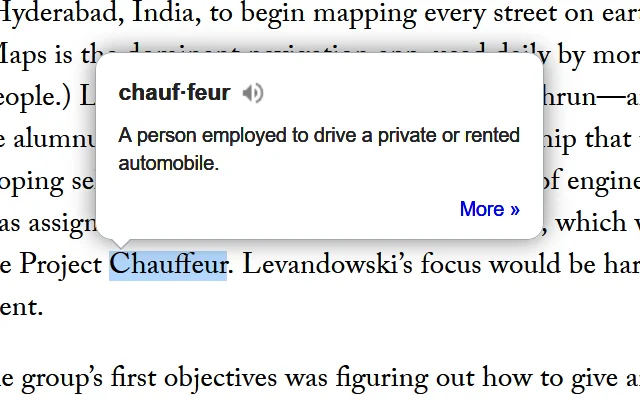
The Dictionary Anywhere extension is designed to enhance reading comprehension by providing immediate access to word definitions without interrupting workflow. By simply double-clicking any word, users can view its meaning in a compact pop-up bubble, allowing uninterrupted focus on the content at hand. This tool is particularly beneficial for language learners, students, and professionals who engage with complex texts regularly. The extension supports multiple languages, including English, Spanish, German, and French, enabling users to expand their vocabulary across different linguistic contexts. It is intended for individuals seeking to improve reading fluency and comprehension while minimizing distractions.
Real-world applications include studying academic materials, reading professional documents, or exploring literature in a foreign language. The tool helps users understand unfamiliar terms instantly, reducing the need to switch between tabs or applications. While the developer’s background is not publicly detailed, the extension’s straightforward functionality suggests a focus on usability and efficiency. It is available as a browser-based solution, compatible with Windows, Mac, and Linux operating systems. The extension integrates seamlessly into existing reading environments, making it ideal for users who prioritize productivity and cognitive flow during learning or work sessions.
Key Features & Capabilities
- Instant Pop-Up Definitions – Double-click any word to view its definition in a non-intrusive pop-up bubble, allowing users to maintain focus on their reading material.
- Multi-Language Support – Offers definitions in English, Spanish, German, and French, supporting users in language learning and cross-lingual reading.
- Language Preference Customization – Users can change the default language through the Add-ons page by navigating to Extensions, selecting Dictionary Anywhere, and adjusting preferences.
- Offline Word Saving – Enables users to download previously looked-up words and their meanings for later review, aiding in vocabulary retention and study.
- Seamless Workflow Integration – Designed to work within existing browser environments without requiring additional steps or application switching.
For example, a student reading a research paper in English can instantly understand a technical term without leaving the page. A language learner reading a French article can toggle to French definitions for unfamiliar words. The ability to save words for later practice supports long-term learning and reinforces memory. The extension’s minimal interface ensures it does not interfere with content visibility or navigation, preserving the user’s focus and reading rhythm.
User Interface, Workflow & Performance
The user interface is minimal and context-aware, relying on a small pop-up bubble that appears only when a word is double-clicked. This design prioritizes visibility without clutter, ensuring the reading experience remains unobstructed. Navigation is intuitive: users access settings via the browser’s Add-ons page, where they can manage the extension’s preferences, including language selection. The workflow is streamlined—no additional windows, pop-ups, or redirects are required.
Performance observations are based on general software behavior patterns. The extension operates within the browser environment, and its impact on CPU or RAM usage is not specified by the developer. However, its lightweight design, with a file size of 3.4 MB, suggests efficient resource utilization. Stability is expected to be consistent, given the extension’s focused functionality. The developer did not provide additional system requirements or performance benchmarks. Users can expect a responsive interaction when double-clicking words, though actual responsiveness may vary depending on the browser and system configuration.
Compatibility & System Requirements
Dictionary Anywhere is compatible with Windows, Mac, and Linux operating systems. It functions as a browser extension, meaning it integrates with popular web browsers such as Chrome, Firefox, and Edge, though specific browser versions are not listed. The installation size is 3.4 MB, indicating a lightweight footprint. The software version is 1.0.1, released on April 15, 2024.
Exact system requirements were not listed. Compatibility information is limited to the supported platforms. The developer did not specify minimum hardware requirements, such as RAM or processor speed. Users should ensure their browser is up to date for optimal performance. No additional dependencies were mentioned. Platform compatibility is assumed to be broad, given the multi-OS support, but users are advised to verify functionality within their specific environment.
Pros and Cons
Pros
- Provides instant access to word definitions without leaving the current page.
- Supports multiple languages, enhancing its utility for language learners.
- Allows users to save words for offline review, supporting long-term vocabulary building.
- Minimal interface reduces visual clutter and maintains reading focus.
- Free to use with no hidden costs or subscription models.
Cons
- Language switching requires navigating through browser settings, which may be less intuitive for new users.
- Exact performance impact on system resources was not disclosed.
- Only available as a browser extension; no standalone desktop application is provided.
- Offline functionality is limited to saved words; no full offline dictionary access is available.
- Support for additional languages beyond English, Spanish, German, and French was not confirmed.
FAQ Section
Is Dictionary Anywhere compatible with all web browsers?
While the extension is designed for use across major browsers, specific browser compatibility details were not provided. Users are advised to check their browser’s extension store for availability.
Can I use Dictionary Anywhere without an internet connection?
The extension requires an internet connection to retrieve definitions. However, users can download previously searched words for offline review, allowing limited study without connectivity.
How do I change the language of the definitions?
Navigate to the Add-ons page in your browser, select Extensions from the sidebar, choose Dictionary Anywhere, click on Options (or Preferences on Mac), select your desired language, and save the changes.
Is the software safe to install?
As a browser extension from a publicly available source, it is recommended to install only from official extension stores. The developer did not provide security certifications or third-party audits.
Does the extension receive regular updates?
The current version is 1.0.1, released on April 15, 2024. The update frequency is not specified. Users should monitor the extension’s page for new releases and improvements.
Final Thoughts
Dictionary Anywhere delivers a focused, efficient solution for improving reading comprehension and vocabulary acquisition. Its ability to provide instant definitions via a simple double-click eliminates the friction of external searches, making it ideal for students, professionals, and language learners. The multi-language support and offline word-saving feature add meaningful value for users committed to long-term language mastery. While the interface is simple and functional, the lack of detailed system requirements and performance data limits deeper evaluation. Nonetheless, its lightweight nature and free availability make it a low-risk, high-reward tool for anyone who reads regularly.
For those seeking to enhance their understanding of complex texts without disruption, this extension offers a practical and effective solution. It stands out as a productivity tool that respects the user’s attention and workflow.
Download Dictionary Anywhere now







